
No one cares about failed SSH authentications, but what about successful ones?
Someone accessed your server and you don’t know about it!
Every server with an open SSH port is subjected to brute force attacks and there are many ways to prevent these.
Fail2Ban, obfuscating the port from 22 to something else, configuring SSHD:
PermitRootLogin no
PasswordAuthentication no
Awesome!
You have done your due diligence to ensure no one can access your server except you.
But remember this Hackathon you attended? You went to grab a drink and left your Notebook unlocked and someone swiftly stole your SSH private keys.
Since that day this person accessed your server and you never noticed.
Get information about successful SSH authentications #
You could set up a monitoring solution like Zabbix to get alerts or similar software.
But now you have to maintain another system.
Start simple, let the system itself send you notifications about successful SSH authentications!
Edit your SSHD config /etc/ssh/sshd_config and ensure the following is configured:
UsePAM yes
ExposeAuthInfo yes
Now create a /usr/local/bin/ssh-notify.sh file:
sudo touch /usr/local/bin/ssh-notify.sh
sudo chmod 755 /usr/local/bin/ssh-notify.sh
Edit the /etc/pam.d/sshd file and append at the end:
session optional pam_exec.so quiet /usr/local/bin/ssh-notify.sh
Test and restart your sshd service:
sudo sshd -t
sudo systemctl restart ssh
Now we can code whatever we want in the /usr/local/bin/ssh-notify.sh file.
For example we could send a mail:
#!/bin/sh
[ "$PAM_TYPE" = "open_session" ] || exit 0

TIME=$(date -Is)
HOST=$(hostname)

MAIL_FROM="ssh-alerts@domain.tld"
MAIL_TO="you@domain.tld"
SMTP_URL="smtps://smtp.your-provider.com:465"
SMTP_USER="ssh-alerts@domain.tld"
SMTP_PASS="your-smtp-password"

MAIL=$(printf 'From: %s\nTo: %s\nSubject: SSH login: %s@%s from %s\nDate: %s\n\nTime:    %s\nUser:    %s\nHost:    %s\nFrom IP: %s\nTTY:     %s\nService: %s\n' \
  "$MAIL_FROM" "$MAIL_TO" "$PAM_USER" "$HOST" "$PAM_RHOST" "$(date -R)" \
  "$TIME" "$PAM_USER" "$HOST" "$PAM_RHOST" "$PAM_TTY" "$PAM_SERVICE")

printf '%s' "$MAIL" | curl -s -m 10 --url "$SMTP_URL" \
  --user "$SMTP_USER:$SMTP_PASS" \
  --mail-from "$MAIL_FROM" \
  --mail-rcpt "$MAIL_TO" \
  --upload-file - >/dev/null 2>&1 &

exit 0
Now you get a mail every time a successful SSH authentication happens and it looks like this:
Time:    2026-08-06T09:04:43+00:00
User:    root
Host:    my-domain.tld
From IP: I Am Not Publishing my IP here!
TTY:     ssh
Service: sshd
Send the data elsewhere! #
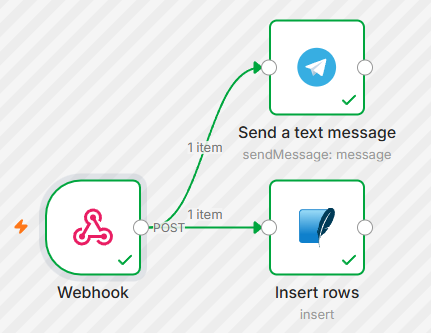
Instead of writing more complex BASH script we can just send the data somewhere else for example N8N.
With a N8N Webhook node we can receive data, so here is the BASH script to send the data to a N8N Webhook:
#!/bin/sh
[ "$PAM_TYPE" = "open_session" ] || exit 0

esc() { printf '%s' "$1" | sed 's/\\/\\\\/g; s/"/\\"/g' | tr -d '\n'; }

BODY=$(printf '{"time":"%s","user":"%s","rhost":"%s","tty":"%s","service":"%s","host":"%s"}' \
  "$(date -Is)" "$(esc "$PAM_USER")" "$(esc "$PAM_RHOST")" "$(esc "$PAM_TTY")" \
  "$(esc "$PAM_SERVICE")" "$(esc "$(hostname)")")

curl -sk -m 5 -X POST "https://n8n.domain.tld/webhook/b234e48d-9ad3-4cf3-a2ab-4586d1b6755e" \
  -H "Content-Type: application/json" \
  -H "Authorization: ae46c075fe6a629efb1eaa5c5b1672a7" \
  -d "$BODY" >/dev/null 2>&1 &
exit 0
From there we can do whatever we want with the data like store them in a SQLITE database and send a Telegram notification.
Comments, suggestions, feedback? Use our Forum.